Cyber Attacks - Advanced Threat Protection
Key Product Features:
Managed EDR:
(Endpoint Detection & Response): Continuously monitors devices for suspicious behavioral patterns rather than just known malware signatures.
Managed Antivirus:
Provides central management and 24/7 SOC monitoring for Microsoft Defender Antivirus, optimizing its configuration to improve effectiveness.
Managed SIEM:
(Security Information & Event Management): Centralizes log data across the network to provide enterprise-grade visibility and real-time threat detection.
Ransomware Canaries:
Deploys lightweight "tripwire" files on endpoints; if these files are modified by encryption, an investigation is immediately triggered to catch ransomware in its late stages.
What It Specifically Protects Against:
Huntress is purpose-built to stop advanced threats that traditional antivirus often misses:
Persistent Footholds:
Detects malware that hides in startup entries or scheduled tasks to survive reboots.
Business Email Compromise (BEC): Identifies attackers impersonating employees or compromising email to steal data.
Ransomware:
Prevents large-scale encryption by identifying early-stage reconnaissance and lateral movement.
Adversary-in-the-Middle (AiTM): Spots sessions compromised by attackers who bypass multi-factor authentication (MFA) to swipe session tokens.
Infostealers:
Detects malicious software designed to harvest credentials and sensitive data.
Rogue Applications: Identifies malicious OAuth apps that attackers use to maintain long-term access to cloud environments.
Core Benefits:
24/7 Human-Led SOC Team:
Backed by a Security Operations Center (SOC) of experts who triage alerts, eliminate false positives, and provide human-verified remediation steps.
Huntress 24/7 Security Operations Center | Huntress
Rapid Incident Response:
Offers an industry-leading mean-time-to-respond (MTTR) of approximately 8 minutes.
Active Remediation: Features "Host Isolation" to instantly quarantine infected devices and "Assisted Remediations" to execute cleanup plans with one click.
Compliance Support:
Helps businesses meet requirements for standards such as HIPAA, GDPR, and PCI DSS through detailed reporting and forensic insights.
Operational Efficiency:
Reduces "alert fatigue" by only notifying IT teams of confirmed, high-priority threats that require action.
Hardware Firewall
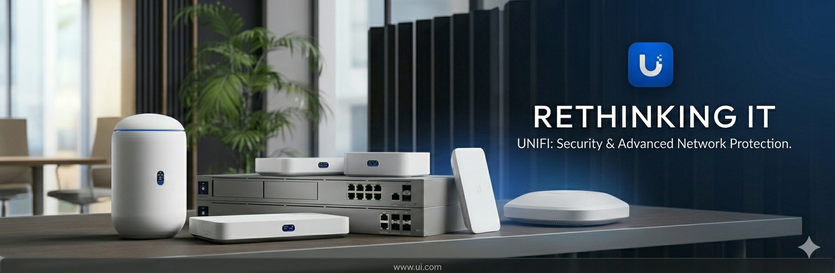
Hardware Firewall Protection
Your network should have firewall protection using a dedicated 'hardware' firewall.
Network-Wide Protection
A single hardware firewall provides comprehensive security for every device connected to the network, including those that cannot run software firewalls, such as printers, medical equipment, and IoT devices. This "single security umbrella" ensures that all bits of data are filtered before they reach any internal gear.
Enhanced Performance
Hardware firewalls have their own dedicated resources (CPU, RAM, and specialized chips like ASICs). Because they handle all traffic inspection on a separate device, they do not consume system resources on your computers or servers, preventing them from slowing down.
Superior Security and Isolation
Since a hardware firewall runs on its own hardened operating system independent of general-purpose OSs like Windows, it is much more resistant to malware and tampering. It creates a physical barrier that stops malicious code from even reaching your internal drives.
Simplified Management and Scalability
Instead of configuring and updating individual firewalls on every device, security of the entire network can be managed from one centralized dashboard. Updates and policy changes made to the hardware firewall are applied simultaneously across all connected computers
IP Security Cameras
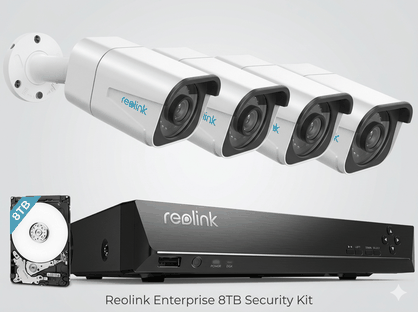
Installation of IP cameras increases the security footprint of your office by providing visual insights directly into your office from your phone or pc, enabling instant visuals, or previously recorded footage.
IT Security and Compliance Agreement
To ensure the safety, stability, and HIPAA compliance of your office network, the following procedures and requirements must be met. Please review these guidelines carefully and sign below.
1. Data Backup Requirements
-
Mandatory: Both Cloud and Local backups are required.
-
Recommended: A NAS (Network Attached Storage) device is highly recommended for robust local redundancy.
-
Automation: Cloud backups run automatically each night and are monitored by our team; no manual action is required on your part.
-
Physical Redundancy: For maximum security, we suggest using two external encrypted USB drives. These should be rotated weekly so that one copy of your data remains physically disconnected (air-gapped) from the server at all times.
2. Cybersecurity Best Practices
-
Email Safety: Treat every email with caution. DO NOT click links, open attachments, or call support numbers provided in emails—even from known contacts.
-
Watch for phishing: Be alert for fake renewal notices (e.g., Norton Antivirus) or urgent invoice/receipt "alerts."
-
-
Web Browsing: Never call phone numbers displayed on pop-up ads claiming your "computer is infected." This is a scam. If you see such a message, contact us immediately.
-
HIPAA Compliance: Huntress Advanced Threat Protection must be active on the server and every workstation to maintain security and regulatory standards.
3. Network Access & Connectivity
-
Staff Wi-Fi: All personal staff devices must use the Guest Wi-Fi only. Connecting personal phones to the Private Wi-Fi risks introducing "rogue" apps into the secure office network.
-
Operating Systems: All computers must run a supported Windows OS. Any system past its "End of Life" (e.g., Windows 7, Windows 10, Server 2012) is a security risk and will not be supported until upgraded or replaced.
-
Hardware Firewalls: A business-grade firewall is required. Units over 7 years old or those with firmware updates older than 2 years must be replaced.
4. Third-Party & Remote Access
NTech discourages the use of 3rd-party remote access (e.g., MB2, EAssist, external bookkeeping).
-
Restrictions: We do not allow RDP (Remote Desktop Protocol) or VPNs using RDP under any circumstances.
-
Authorized Access: If remote access is necessary, it must be performed on a dedicated workstation using our managed ScreenConnect software.
-
Liability: NTech is not responsible for security breaches occurring on networks where unauthorized 3rd-party remote access tools are present.
5. General Hardware & Server Use
-
Apple/Mac Products: These are not supported in offices running a Windows-based network due to compatibility and security limitations.
-
Server Integrity: DO NOT use the server as a workstation. Using the server for daily tasks slows the network and significantly increases the risk of a security breach.
Final Recommendation
Even with these safeguards, no list is "bulletproof." We strongly recommend obtaining Cyber Security Insurance for your practice to protect against unforeseen events.
Acknowledgement: By signing below, you acknowledge that you have read, agree to, and are willing to implement the security procedures outlined above.